Contributing to OSS with reproducible bug reports
#OpenSourceGist
I recently participated in a Twitter Space about contributing to open source projects. During this event, I talked about how contributing to open source has helped me as a developer and to learn from a community.
I also discussed that contributing to open source doesn’t have to be coding a new feature. You can also help with documentation and submit helpful bug reports for maintainers.
If you’d like to contribute to open source but aren’t sure where to start, here’s a story of how we helped debug an issue with the open source project Excalidraw using Replay.
The problem
Excalidraw is a whiteboarding app that we use here at Replay. This GitHub issue initially reported the bug. When an element is resized down to a height or width of zero, the element locks up and can no longer be resized.
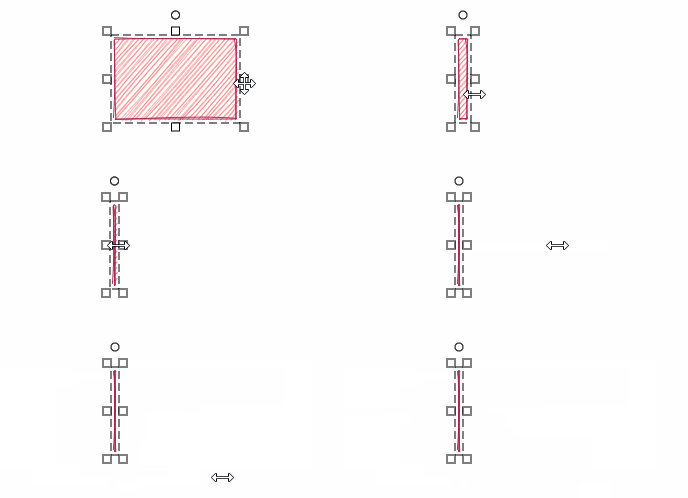
There wasn’t a lot of activity on the issue since first being reported, and there was not a reproducible example. I encountered this issue myself, and decided to record it with Replay to dig in.
The replay
Replay lets you record an issue and share it with the team so that anyone can debug it after the fact with familiar browser developer tools built in. Recording a bug with replay and creating a GitHub issue can be a helpful way to contribute to a project. Bugs are difficult — nearly impossible — to resolve if they can’t be reproduced.
In the replay here, I recorded myself creating an element, resizing it down to zero, and captured the behavior where it locks up.
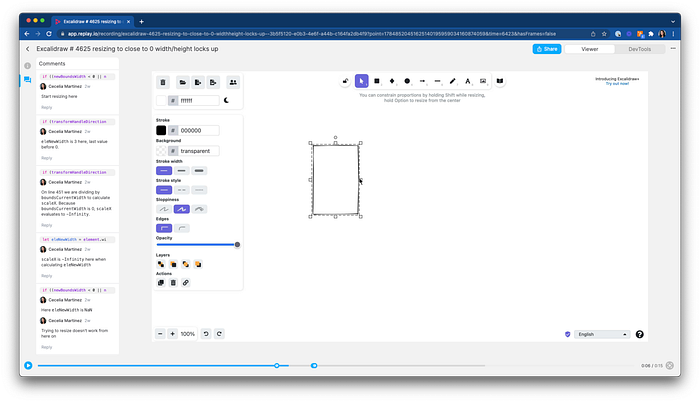
Replay of the bug
If you encounter a bug with an open source project, you can create a recording with replay and attach it to your GitHub issue. This provides a valuable reproducible example for the maintainer.
The debugging process
Providing a replay alone is helpful, but I decided to dive deeper and see if I could find out more about what was causing the issue.
Here is a video of my debugging process:
I was able to use a combination of React DevTools, Source Explorer, and Print Statements to find the source of the error.
Here is the process I followed:
I inspected components in React DevTools tab to find app state. Here I noticed properties like
isResizingandresizingElement, which let me know that there is specific functionality related to resizing an element.I searched
resizein Function Search, which had a few results. I triedresizeSingleElementand saw it had 95 hits, which means it was executed 95 times.
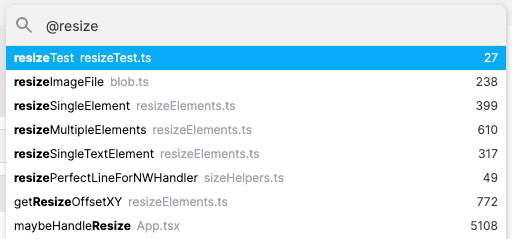
Function Search
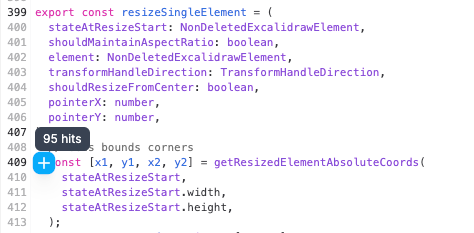
This line executed 95 times — bingo!
- I read through the function and found
eleNewWidth, which I logged to the console using Replay’s print statements. Print statements lets you output values to the console like you would withconsole.log(), but right from the replay. It outputs the value from each time the function executed during the recorded. Here, I could see theeleNewWidthreduce each time until its value becomesNaN.
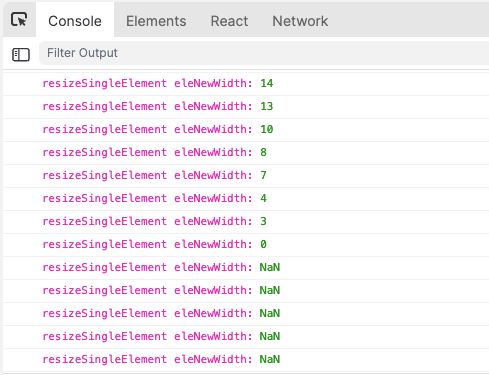
Print statements to the console with Replay
We’re getting closer! I assume that we always want the new width to be a number, so this is likely the source of the bug. Let’s go a little further and see why this is happening. First, I fast-forwarded to the console message where
eleNewWidthisNaNto focus in on this point in time.I found in the function where
eleNewWidthis calculated based onelement.widthandscaleX. I loggedscaleXto the console and see it that after0it becomes-Infinity. So close now!
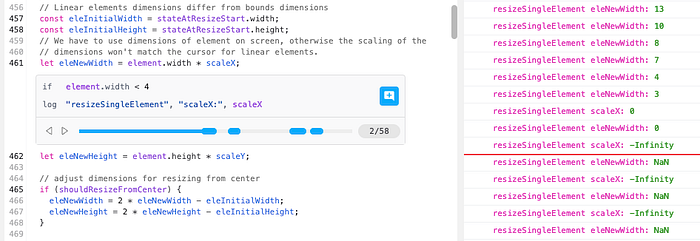
Logging the value of scaleX shows it eventually becomes -Infinity
💡 In the print statement, I’m only logging scaleX when the element.width is less than 4. Replay allows for this conditional logging which helps keep the console neat and only shows the information I need to debug.
- On line
451the code is dividing byboundsCurrentWidthto calculatescaleX. In Replay, I can hover over the variable in my code to see the current value,0. Because dividing by0is impossible, it evaluates to-Infinityand breaks the application.
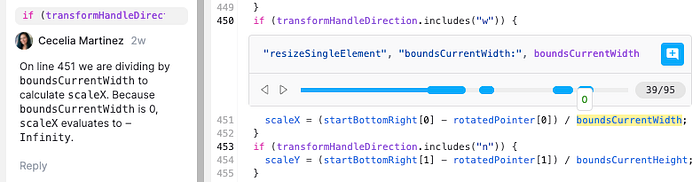
Dividing by zero, a classic math problem.
- With Replay, I can add a comment directly to the line of code and the moment in time where the error occurs. This makes it easy for the maintainer to see what is causing the bug and approach how to fix it.
What’s next
As you can see, adding value as a contributor to an open-source project doesn’t require writing a single line of code. You can:
- Submit reproducible bug reports
- Investigate bugs and provide context for maintainers
- Document the codebase
Replay can help with all three. If you record or solve a bug with Replay, let us know! We’d love to add your contribution to our Replay Examples page.
💡 Do you have an open-source project? Replay provides free plans to OSS projects so you can resolve user issues faster, record automated tests, and upload source maps. Contact us at support@replay.io or in Discord to get started!